


As cloud-based systems grow, so do the risks associated with them. Snyk reported that 80% of companies experienced at least one severe cloud security incident in 2021. This highlights the significant risk businesses face when protecting their data and infrastructure.
Atul Bhagat, President/CEO at BASE Solutions, says, “Every business is a potential target for cloud security threats, and businesses must understand and address these vulnerabilities.”
As cyberattacks become more frequent and sophisticated, understanding these threats and how to mitigate them is critical for the survival of your business.
In this blog, we will discuss different types of cloud security threats and how to protect your data and systems.Stop threats before they
Don’t Let Cloud Risks Slip Through the Cracks
See how BASE Solutions helps you close security gaps before they turn into real problems
hit. Let BASE Solutions secure your cloud with real-time protection and expert insight.
Common Cloud Security Threats Businesses Face
Cloud environments offer flexibility, but they also present unique security challenges. Let’s look at the cloud security threats businesses should be aware of.
1. Data Breaches
One of the most common threats, a data breach, occurs when unauthorized individuals access your sensitive information.
Cloud systems are particularly vulnerable because of their internet-based nature. Hackers aim for valuable data, such as personally identifiable information (PII), financial data, intellectual property, or customer records. The consequences of a data breach are devastating, ranging from financial losses to damage to your brand’s reputation.
For example, the 2019 Capital One breach exposed the personal data of 106 million customers, showcasing how easily cloud platforms can be exploited.
How to Mitigate Data Breaches
- Enable Multi-Factor Authentication (MFA) & Encryption: MFA strengthens account security by requiring multiple verification steps. Encryption ensures stolen data remains unreadable without a decryption key.
- Update Passwords & Monitor Access: Regular password changes minimize breach risks. Reviewing access logs helps detect suspicious activity early.
- Verify Cloud Security Measures: Choose cloud providers with strong protections like MFA, encryption, and strict access controls to safeguard data.
2. Misconfigurations
Cloud misconfigurations occur when businesses fail to properly set up security settings. Whether it’s leaving storage buckets open or not applying appropriate access controls, misconfigurations can leave sensitive data exposed.
A significant example is the exposure of over 100 million records due to misconfigured Amazon Web Services (AWS) buckets in 2017.
How to Prevent Misconfigurations
- Adhere to Cloud Security Best Practices: Configure systems according to your cloud provider’s guidelines and review documentation regularly to stay updated.
- Automate Security Checks: Manual configurations are prone to errors—automated tools help identify and correct misconfigurations efficiently.
- Deploy Cloud Security Posture Management Tools: Continuous monitoring detects vulnerabilities early, preventing exploitation and strengthening cloud security.
3. Insecure APIs
APIs serve as a connection point between your application and cloud services. However, they can also be a gateway for attackers if not properly secured.
Hackers may exploit weak API endpoints to access, modify, or steal data. 86% of codebases contain vulnerabilities from open-source software.
Best Practices for Securing APIs
- Strengthen Authentication & Authorization: Require secure login credentials and enforce MFA to limit access to authorized users.
- Monitor & Alert for Suspicious Activity: Regularly track API usage and set up automated alerts for unusual behaviors.
- Patch Vulnerabilities promptly: Keep APIs updated to prevent exploitation of known security flaws.
Account Hijacking
Account hijacking happens when attackers steal login credentials and gain unauthorized access to cloud accounts. Through phishing and credential stuffing, hackers can control cloud-based accounts and wreak havoc by stealing sensitive data or sabotaging operations.
How to Avoid Account Hijacking
- Use Strong, Private Passwords: Choose complex passwords with letters, numbers, and symbols, and never share them, even if the request seems legitimate.
- Enable Multi-Factor Authentication (MFA): Add an extra layer of security by requiring additional authentication methods like a phone verification code.
- Monitor Account Activity Regularly: Check login history and alerts for unusual behavior to detect and prevent hijacking attempts.
| More articles you might like: |
|---|
Security Threats in Cloud Computing
Understanding security threats in cloud computing helps businesses protect their data and infrastructure from malicious actors.
- Insider Threats
Insiders, such as employees or contractors, pose a unique threat to cloud security. They have legitimate access to your systems, but they may intentionally or unintentionally misuse their privileges.
According to CloudSecureTech, 65% of breaches stem from external actors, while 35% result from employee errors rather than malicious intent. Whether it’s accidental data exposure or malicious intent, insider threats are among the most challenging risks to mitigate.
How to Mitigate Insider Threats
- Restrict Access: Apply the principle of least privilege (PoLP) to ensure employees access only essential data, reducing insider risk.
- Audit & Monitor: Regularly track user activity to detect suspicious actions or unauthorized access attempts.
- Educate Employees: Train staff on cybersecurity best practices to prevent accidental leaks and recognize potential threats.
Denial of Service Attacks (DoS)
A Denial of Service (DoS) attack occurs when a malicious actor floods your cloud system with so much traffic that it crashes. Distributed Denial of Service (DDoS) attacks, which come from multiple sources, are even more devastating. These attacks don’t steal data but can significantly disrupt business operations.
How to Mitigate DoS and DDoS Attacks
- Use DDoS protection tools to detect and prevent attacks. These tools help mitigate the effects of traffic floods by filtering out malicious requests and ensuring that legitimate traffic remains uninterrupted.
- Deploy a robust firewall and intrusion detection systems. Firewalls and intrusion detection systems act as barriers against malicious traffic, preventing unwanted data from entering your network.
- Scale up resources to handle high traffic volumes during attacks. If an attack is detected, rapidly scaling your cloud infrastructure ensures that you can handle increased traffic.
Other Cloud Computing Security Threats to Look Out For
Cloud computing offers many advantages, but without the right security measures, it can expose businesses to lots of threats.
Advanced Persistent Threats (APT)
Advanced Persistent Threats (APT) are carefully planned, long-term attacks where hackers infiltrate systems to gather intelligence over time. These threats are dangerous because they remain undetected for extended periods, causing significant damage.
How to Prevent APTs
- Restrict Access: Apply the principle of least privilege (PoLP) to ensure employees access only essential data, reducing insider risk.
- Audit & Monitor: Regularly track user activity to detect suspicious actions or unauthorized access attempts.
- Educate Employees: Train staff on cybersecurity best practices to prevent accidental leaks and recognise potential threats.
Data Loss and Leakage
Data loss occurs when data is deleted or becomes inaccessible, while data leakage happens when sensitive data is exposed.
Both scenarios are significant threats in cloud environments, often resulting from poor cloud management or human error.
How to Prevent Data Loss and Leakage
- Maintain Backups in Multiple Locations: Store copies both physically and in the cloud to ensure accessibility in case of system failure.
- Encrypt Data at Rest & in Transit: Protect sensitive information so it remains unreadable if intercepted.
- Use Data Loss Prevention (DLP) Tools: Continuously monitor cloud data to detect and block unauthorized sharing or leaks.
How to Protect Your Business From Cloud Security Risks
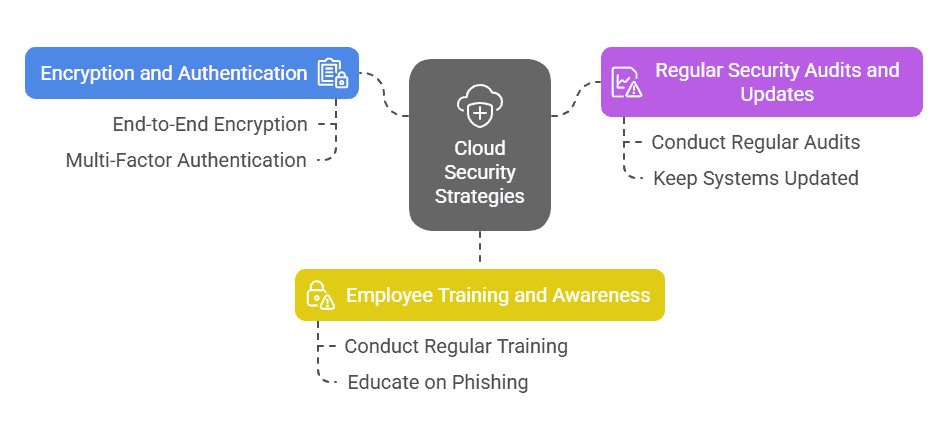
Businesses must actively safeguard against cloud security risks to keep their data protected.
Use of Encryption and Strong Authentication
Encryption and strong authentication are key to ensuring that your cloud data remains safe. Without these measures, sensitive information is vulnerable to unauthorized access.
Best Practices:
- Use End-to-End Encryption: Protect data in transit and at rest, ensuring it remains secure across networks and cloud storage.
- Enable Multi-Factor Authentication (MFA): Microsoft reports that MFA blocks 99.9% of account breaches, making it essential for user security.
- Encrypt Cloud-Stored Data: Prevent unauthorized access by securing data with encryption, even if an account is compromised.
Regular Security Audits and Updates
To stay ahead of potential threats, conducting regular security audits and applying timely updates are essential practices.
Audits help identify vulnerabilities, while updates ensure that systems are protected from newly discovered risks.
How to Stay Secure:
- Conduct Regular Audits & Assessments: Identify and fix vulnerabilities before they can be exploited.
- Keep Systems Updated: Apply patches promptly to address newly discovered security gaps.
- Utilize CSP Security Tools: Leverage provider-managed security features to enhance cloud protection and compliance.
Employee Training and Awareness
Cybersecurity awareness training cuts security risks by 70%. Your employees play a vital role in securing cloud systems. Ensuring they’re well-trained on identifying threats like phishing emails and following best practices can significantly reduce the risk of attacks.
How to Train Employees:
- Conduct Regular Training: Keep employees updated on evolving threats and security best practices.
- Educate on Phishing & Social Engineering: Teach staff to recognize suspicious emails and deceptive requests to prevent breaches.
- Promote a Security-First Culture: Encourage employees to report anomalies and integrate cybersecurity into daily operations.
Cloud Security Compliance and Regulations Overview
Cloud security compliance is a crucial part of managing risk. Different industries have specific regulatory frameworks that businesses need to follow.
The table below provides an overview of key compliance standards and best practices for businesses using cloud services.
| Compliance Standard | Description | Cloud Security Best Practices |
| GDPR (General Data Protection Regulation) | Protects personal data and the privacy of EU citizens. | Implement data encryption, anonymization, and ensure data subject rights are respected. |
| HIPAA (Health Insurance Portability and Accountability Act) | Ensures the protection of health information in the U.S. | Encrypt patient data, restrict access to healthcare data, and audit access logs regularly. |
| ISO/IEC 27001 | International standard for information security management. | Establish a robust information security management system (ISMS), conduct regular audits. |
| SOC 2 (Service Organization Control 2) | Focuses on five trust service criteria: security, availability, processing integrity, confidentiality, and privacy. | Implement strong access controls, encrypt data, and regularly audit systems for compliance. |
| PCI-DSS (Payment Card Industry Data Security Standard) | Provides privacy rights to California residents. | Implement data protection mechanisms, and provide consumers with access and deletion rights. |
Protect Your Cloud Infrastructure with BASE Solutions
Mitigating cloud security threats is a vital part of safeguarding your business. With risks like data breaches and insider threats, proactive steps are critical to secure your cloud environment. You can significantly reduce your chances of falling victim to an attack by implementing encryption, conducting regular security audits, and training your employees.
BASE Solutions offers industry-leading cloud security solutions with over 20 years of experience in IT services. We provide 24/7 monitoring and a 15-minute response time for customer service.
Contact us today to learn more or schedule a consultation and take the first step toward securing your cloud environment.